Powered by our AI agents, delivering personalization and scalability across your entire funnel.

Powered by our AI agents, delivering personalization and scalability across your entire funnel.
Discover how charlesAI empowers your business with advanced features and explore the complete product overview.
 See more
Powered by our AI agents, delivering personalization and scalability across your entire funnel.
Powered by our AI agents, delivering personalization and scalability across your entire funnel.
Discover how charlesAI empowers your business with advanced features and explore the complete product overview.
See more
Powered by our AI agents, delivering personalization and scalability across your entire funnel.


An AI agent can answer a question, look up an order status or connect a customer with your service team. What it can do depends on its knowledge, the systems it connects to and the permissions it has:
| Customer question | How the agent helps | What it needs |
|---|---|---|
| “Which countries do you deliver to?” | It lists the countries the shop delivers to. | Current delivery information |
| “How do I register a return?” | It explains the steps and links to the returns portal. | Returns instructions and a link to the portal |
| “How should I care for this product?” | It explains how to look after the item. | Care instructions for the correct product |
| “Where is my order?” | It gives the current delivery status. | Access to the correct order and current delivery data |
| “My item is damaged. Can I get a replacement?” | It gathers the details and passes the case to the team for a decision. | The relevant details and a connection to the service team |
The agent can explain how to return an item. To issue a refund as well, it needs a shop integration that supports refunds and permission to use that function. Your service policies determine when it may refund a customer.
The agent can draw on existing content from your help centre, product pages or internal support documents. You choose which content it can use. It writes a response to the customer's question using that information. You do not need to create every possible question and answer in advance.
An AI chatbot can also answer questions worded differently from your FAQs. What matters is whether it has the information it needs. Common customer questions help you spot gaps; they do not limit the questions the agent can answer.
The content should be current and consistent. If an old PDF gives a different delivery time from your help centre, the agent needs the correct information. When delivery policies or product details change, it needs access to the updated content too.
You can also adapt its language to your brand: how formal it sounds, how much detail it gives and which product names it uses.
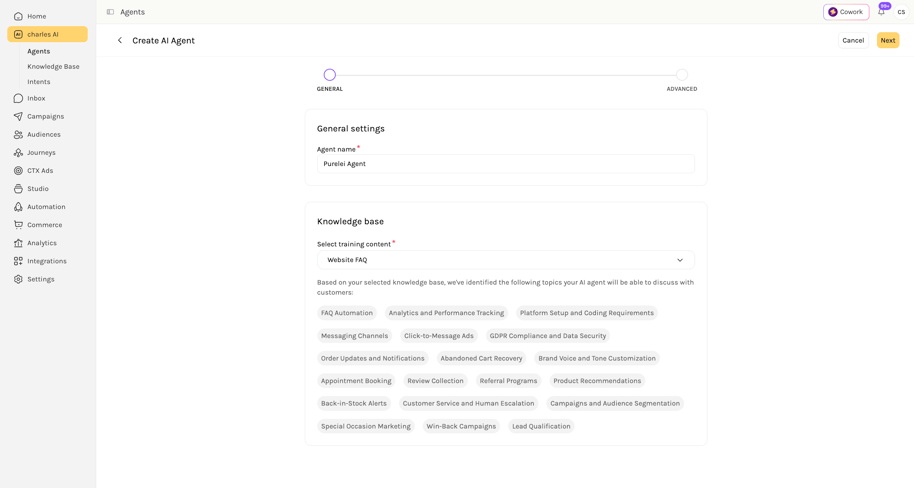
A general delivery FAQ cannot tell a customer where their parcel is. The agent needs information about that specific order. A suitable connection to your shop or shipping system lets it look up the details and answer the customer.
The information available depends on the integration. A product catalogue, for example, does not provide shipment tracking. Your software provider can explain which order details the agent can retrieve and whether it can also make changes.
Before sharing personal order details, the agent needs to establish that the order belongs to the customer asking. If information is missing, it should ask for it. If it cannot retrieve the data, it should explain that and offer help from the service team.
A context-aware agent also uses what has already been established in the chat. If a customer asks about an order and then about a return, it can relate both questions to the same order. It draws on the conversation so far and the available shop data.
Our WhatsApp Business API guide explains how WhatsApp connects to the software your service team uses.
An AI agent should not give an answer without a reliable basis for it. When it cannot answer a question, it must not make something up. These invented answers are known as hallucinations. Instead, it should explain that it cannot resolve the question and involve a person.
Critical cases need the same care, such as a report of a potentially unsafe product or a disputed refund. Your rules determine which enquiries go straight to the team. A customer's explicit request to speak to a person should also trigger a handover.
With a helpdesk integration in place, a ticket can be created automatically. It should include the enquiry, the chat so far, available order details and the reason for escalation. The relevant team can then investigate without asking the customer to explain everything again. For critical cases, the ticket should also make the urgency clear.
Outside service hours, the agent should explain what happens next. It should give a response time only if the team can meet it.
These examples are fictional. The agent knows the shop's delivery information but cannot check individual shipments. Automatic ticket creation is set up for those cases.
Customer: “Do you deliver to Austria?”
AI agent: “Yes, we deliver to Austria. You'll see the delivery charge at checkout before you pay.”
For a question about a particular shipment, it passes the case to the team:
Customer: “My parcel is marked as delivered, but it isn't here.”
AI agent: “I can't check your shipment here. I've created a ticket for our service team and included this chat.”
That confirmation should appear only after the ticket has been created successfully. The agent must not invent a completed handover either.
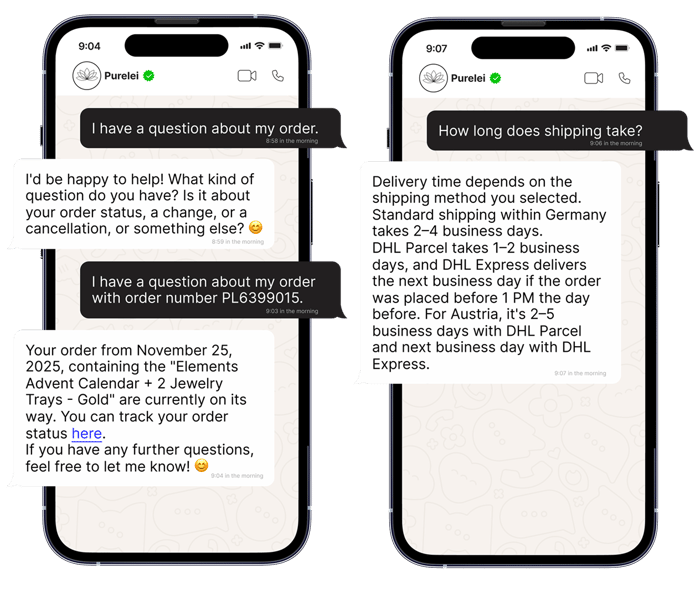
With a suitable shop or shipping integration, the agent can handle WISMO (“Where is my order?”) questions itself. It can look up the current shipping status and send a tracking link, provided the integration supplies that information.
If a parcel is marked as delivered but has not arrived, a tracking link alone does not resolve the issue. If the available information cannot explain what happened, the agent hands the case to the service team.
In charles, you can try the agent in a testing environment before it goes live. You can see how it responds to customer questions, uses the available information and follows your brand's tone of voice. Real support questions work well here once unnecessary personal details have been removed.
There are three things to look at:
For more complex setups, automated tests and evaluations can complement the conversations you try yourself. They let you run typical and difficult cases again after making changes.
After launch, real conversations show where the agent can improve. Repeated follow-up questions on one topic may point to missing information or an explanation that is too general. The relevant content or the agent's instructions can then be updated.
The goal is a high automated resolution rate: the agent should resolve as many enquiries as possible correctly, without the team needing to step in. A quick, convincing reply only helps if it actually addresses the customer's enquiry.
These metrics help you assess that:
charles Agent Analytics helps you assess conversation quality. Sentiment analysis can also indicate whether customers seem satisfied or frustrated. This helps you spot recurring problems and look at individual chats to understand the causes.
A resolution rate needs a clear definition of when an issue is resolved. A chat ending does not prove that on its own. Filling knowledge gaps or connecting missing data can help the agent resolve more cases itself. Critical enquiries should still go to the team.
PURELEI uses a WhatsApp FAQ agent for questions about delivery, returns and product care. For more complex enquiries, the team receives the information already gathered. Our PURELEI Success Story reports more than 2,000 FAQ conversations resolved by the agent per month in the first few months.
“WhatsApp is a multi-million-euro channel for us. Automating FAQs with charles means we can scale revenue and conversations while reducing manual workload at the same time.”
Jessica Hutchinson, Head of Retention at PURELEI
Not every business needs the same capabilities. With charles, you can tailor your AI agent to the work it needs to do: from answering simple service questions to handling tasks that require current shop data or access to several systems.
A pharmacy could, for example, upload a PDF with its opening hours, address and collection instructions. The agent can use it to answer questions such as “When are you open?” or “How does collection work?” That PDF may be enough for these service questions. Questions about medicines go to the pharmacy team.
Our FAQ automation can also use content from your help centre or other documents. Brand voice, testing and human handover matter for a simple use case too.
An agent needs more information to give customers individual answers or product recommendations. With the right integration, it can use your product catalogue, stock availability and order details. It considers the conversation so far and the customer's situation, such as an order already discussed or product preferences they have shared. The data and actions available depend on the integration you set up.
A larger business with several shops or brands may have more complex requirements. For example, the agent may need to find the right order, update information in the CRM and pass enquiries to the relevant team. Multiple systems and tools can work together in one workflow to support this. The data the agent is allowed to change is defined for each use case.
We build these solutions with your team. Conditions can determine which service team receives an enquiry. Guardrails define which answers and actions are allowed and when a person needs to take over. Tests and evaluations are tailored to those tasks.
In a demo with our team, we can explore which solution fits your customer service.